
Beyond the Build: Why I Halted a Fully Functional Cloud ETL Pipeline
“How I built an end-to-end serverless data pipeline from QuickBooks to Slack, Sheets, and Dashboards.”
TL;DR
- Goal: Build an automated data pipeline extracting accounting data from legacy QuickBooks Desktop to Cloud SQL, Tableau, and Slack.
- Tech Stack: Google Cloud Functions (2nd Gen), Cloud SQL (MySQL), Pub/Sub, Z-Cron, QXL.
- Key Achievements: Overcame the 20-hour full-export limitation by engineering a custom incremental UPSERT architecture. The pipeline successfully passed all tests, running syncs in seconds during midnight batches.
- Core Lesson (TPM Leadership): Despite technical success, the legacy VDI environment was already notoriously unstable. Introducing an automated extraction tool (QXL) added an unacceptable variable of risk. I halted deployment, recognizing that in a reality where we were forced to use Desktop due to QuickBooks Online’s lack of item-level progress invoicing, protecting core operations outweighed having a modern dashboard.
1. The Background
Management and business leaders thrive on real-time data flows to make informed decisions. The ultimate goal was to check payment statuses instantly via Slack commands and view daily-updated Tableau dashboards. However, our company’s core accounting system was confined to a closed, on-premise legacy environment: QuickBooks Enterprise (Desktop Version).
2. The Problem: The Legacy Bottleneck
This project faced massive technical hurdles from day one:
- No REST API: The desktop version lacks a standard REST API, making direct integrations with modern BI tools or cloud databases impossible.
- The 20-Hour Full Export Trap: The third-party extraction tool (QXL) did not support partial/incremental extraction. Exporting over 150 tables and hundreds of thousands of records required a “Full Export” every time, taking over 20 hours and destroying any hope of “real-time” data.
- Desktop Dependency: It was a rigidly manual process that required logging into a Windows Virtual Desktop Infrastructure (VDI) to authenticate sessions.
3. The Tech Stack
- Local Automation: Windows VDI, Z-Cron, QXL (QODBC)
- Cloud Infrastructure (ETL): Google Cloud Functions (2nd Gen), Cloud SQL (MySQL), Pub/Sub, Cloud Scheduler, VPC Connector
- Data Consumption: Tableau, Slack App, Google Apps Script
4. The Strategy: Incremental Cloud Sync
Running a 20-hour full backup daily was functionally useless. I deliberately chose not to take the easy route of simply dumping CSVs into Google Drive for Tableau to read. Our company already had project management (PM) data centralized in a data warehouse (Cloud SQL) via Google Sheets. The ultimate goal was to mix and join this financial data with existing operational data to derive multi-dimensional insights.
Therefore, I applied the principle of Separation of Concerns. The heavy local environment was relegated to a simple “Push” mechanism (dumping raw data), while the complex logic of identifying data deltas and overwriting production databases was entirely offloaded to the robust computing power of the cloud (Google Cloud Functions).
5. The Solution Architecture
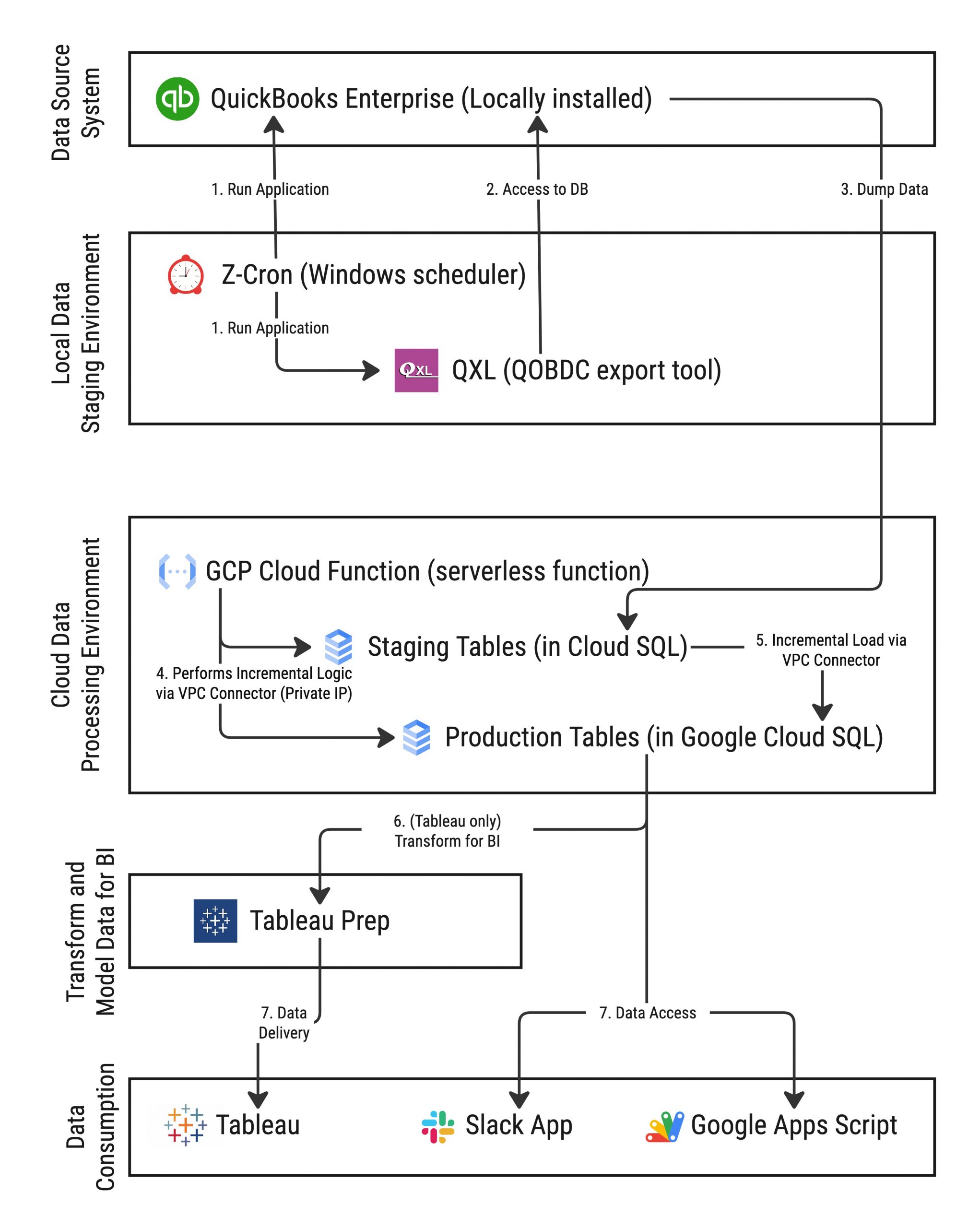
- Local Extraction (Staging): In the Windows VDI, the Z-Cron scheduler triggers QXL to extract QuickBooks data and push it directly into staging tables in Cloud SQL.
- Cloud Functions UPSERT: Triggered daily via Pub/Sub, a Cloud Function scans the
TimeCreatedandTimeModifiedmetadata of the staging tables. - Sync & Serve: It isolates only the changed data and performs an Incremental UPSERT into the production tables. This clean, analytics-ready data is immediately consumed by Tableau dashboards and Slack bots.
6. Technical Deep-Dive 1: Fault Tolerance & 7-Day Rollback
A single data corruption in a financial pipeline compromises the integrity of the entire system. To prevent this, I avoided relying on a single sync timestamp. Instead, I engineered a tableSyncTracker table. This tracker stores the sync history of the last 7 days (sync_time_1 through sync_time_7). In the event of an erroneous overwrite, this architecture provides enterprise-grade fault tolerance, allowing the system to safely roll back to a previous timestamp and re-run the pipeline.
7. Technical Deep-Dive 2: Secure VPC Networking
To prevent sensitive accounting data from being exposed externally, I explicitly avoided using public Auth Proxies. Instead, I configured a VPC Connector (Private IP). This ensures that the Cloud Function accesses Cloud SQL strictly through Google Cloud’s internal private network, achieving top-tier security compliance.
8. The Plot Twist: The Executive Decision to Halt Deployment
Technically, the pipeline was a masterpiece. Beautiful charts populated in Tableau, and the Incremental Sync—scheduled for midnight to process minimal deltas—passed all tests, finishing in mere seconds. However, I made the executive decision to permanently halt the production Go-Live of this pipeline.
The issue wasn’t the code; it was the baseline instability of the legacy Virtual Desktop Infrastructure (VDI) running QuickBooks. The environment was already notoriously fragile, prone to random crashes simply from multiple finance team members logging in simultaneously.
This was not a hardware issue that could be solved by adding RAM, nor could it be bypassed by creating a dedicated isolated VM. To extract the data reliably and without corruption, the third-party extraction tools required QuickBooks to be accessed in ‘Single-User Mode.’ However, activating Single-User Mode inherently blocks and kicks out all other concurrent users from the company file. The software’s very architecture guaranteed that running the extraction would disrupt the finance team’s live environment.
Even though the sync ran flawlessly at midnight, introducing an automated extraction tool into an already highly unstable system presented an unacceptable variable. If the system crashed during business hours, isolating the cause would be impossible. I could not risk jeopardizing the finance team’s core accounting operations just to provide a shiny dashboard to management.
9. Conclusion: A Successful Failure
The irony is that we had originally attempted to migrate to QuickBooks Online (QBO). However, QBO completely lacked support for “Item-level Progress Invoicing”—an absolute necessity for our billing workflow. This functional gap forced us to revert to the clunky, unstable Desktop version.
Instead of sweeping this halted project under the rug, I presented it to executive management as an “Infrastructure Audit Result.” I showcased the flawlessly working Tableau dashboard (the Value) alongside the load-testing crash logs (the Risk). I framed the choice clearly: “We can deploy this dashboard tomorrow, but it carries a high risk of paralyzing the finance team. Do we accept this risk?”
A junior engineer might have ignored the broader context and deployed the pipeline because “the tests passed.” But the core duty of a Technical Product Manager is to manage risk and protect the business. This “safe failure” proved with hard data that band-aiding a legacy on-premise system has a hard ceiling. Ultimately, this transparency built executive trust and became the catalyst for pivoting the company’s long-term IT strategy toward a complete, ground-up migration to a modern cloud-native ERP.