
Smart AI Automation: Building a Cost-Effective Receipt Data Pipeline
How I combined local scripts with Google Gemini to extract data from global receipts—maximizing accuracy while minimizing AI costs.
TL;DR
- Goal: Automate receipt data extraction across multiple languages and formats while improving reliability and minimizing AI API costs.
- Tech Stack: Python (Pydantic), Google Gemini APIs (Multi-model consensus), Google Sheets API, Local Shell Scripting.
- Key Achievements: Achieved $0 API charges within free-tier limits using lightweight AI models; built a human-in-the-loop feedback system that reuses vendor-specific corrections; separated AI extraction from procedural logic to improve data reliability and cost efficiency.
1. The Background
My background lies in data visualization, data analysis, and developing corporate ERP (Enterprise Resource Planning) systems. I know what good, clean data looks like, and I know how painful it is to process messy, unstructured data. For a long time, my global travel receipts (from Korea, Japan, the US, and Australia) were a challenge to track. They feature different languages, varied date formats, and unique tax rules. I wanted to automate this process, but I wanted to approach it practically, focusing on high ROI rather than over-engineering.
2. The Problem: The Cost of AI Over-reliance
Throwing every single problem at the smartest, most expensive AI model is an easy fix, but it’s a poor architectural decision. It creates latency, and API costs scale incredibly fast. On the other hand, traditional OCR can extract text but often struggles to interpret contextual differences between subtotals, inclusive taxes, and tips. I needed a middle ground.
3. The Tech Stack
To build a reliable and cost-effective receipt processing system, I utilized the following technologies:
- AI & LLM: Google Gemini APIs (using a multi-model consensus approach to mitigate AI hallucinations)
- Data Pipeline & Validation: Python (with Pydantic for strict JSON schema enforcement and data validation)
- Data Storage & Review Interface: Google Sheets API (
gspread) - Automation: Local environment shell scripting (
zsh) andcronfor daily batch jobs
4. The Strategy: Decoupling AI from Traditional Automation
My core philosophy for this project was: Do not use AI for things that standard code can do.
I wanted to maximize the benefits of AI while aggressively cutting costs and ensuring strict data integrity. I separated the workload:
- AI Integration: Used strictly for its cognitive strength—reading the messy receipt image, interpreting the text, and extracting unstructured data.
- Local Automation: Used for procedural logic. Moving files, filtering out previously processed data, enforcing strict Pydantic data schemas, and handling API rate limits.
By limiting AI to unstructured data extraction and handling validation and workflow logic through traditional code, I reduced unnecessary API usage while building a more reliable and cost-conscious pipeline.
5. The Solution Architecture
To achieve this, I built a hybrid architecture connecting a local environment, the Gemini API, and Google Sheets.
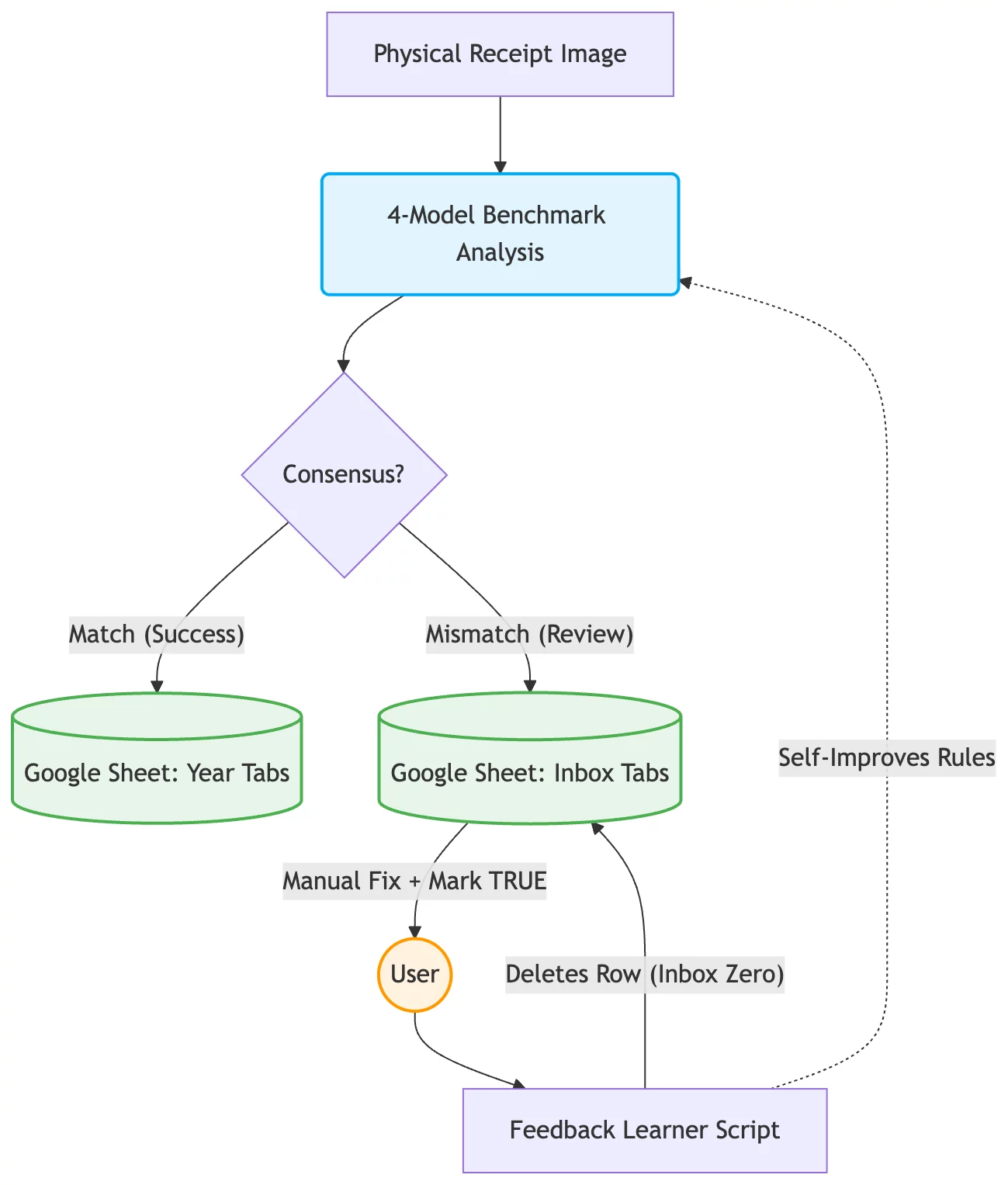
1. Scheduled Batch Processing Every night, a scheduled task in my local environment activates a Python script. It organizes the raw image files and filters out anything that has already been processed, ensuring no API calls are wasted.
2. Multi-Model Cross Validation Instead of relying on one expensive AI model, the script queries four different, lightweight Gemini models concurrently. If the models agree on key fields such as Vendor Name and Total Amount, the system accepts the result for automated processing. Disagreements are routed for manual review.
3. Google Sheets as a “Human-in-the-Loop” Dashboard I avoided building a custom web UI for error resolution. If the AI models disagree, the data is pushed to a “Needs Review” tab in Google Sheets. Because I am highly comfortable with spreadsheets, fixing data here is frictionless. I simply correct the value, flag it as reviewed, and close the sheet.
4. Human-in-the-Loop Feedback System A local feedback script monitors manual corrections in Google Sheets and converts them into reusable vendor-specific rules. These rules are cached locally and applied to future receipts, helping prevent recurring extraction errors without retraining the AI models. Once a correction is saved as a reusable rule, the entry is automatically removed from the review tab, maintaining a clean “Inbox Zero.”
6. Results & Benefits
- Zero API Costs: During personal use, the pipeline incurred no API charges by filtering unnecessary requests and operating within the available free-tier limits.
- Feedback-Driven Rule Improvement: Human corrections are converted into reusable vendor-specific rules, helping reduce recurring extraction errors without retraining the underlying AI models.
- Frictionless Error Handling: Fixing an error is as simple as correcting the value and marking it for review in Google Sheets, without manually editing the underlying data pipeline.
- Structured Dataset for Future Model Evaluation and Training: Validated receipt data and human corrections create a growing dataset that can support future accuracy evaluation and supervised fine-tuning.
7. Enterprise Applications & Business Value
While a “zero-cost” API setup works well for personal projects, enterprises processing massive volumes of B2B invoices and receipts daily will inevitably require paid API tiers. However, the architectural principle remains exactly the same: avoid over-spec AI models to ruthlessly minimize operational costs.
For example, based on Google’s published standard API pricing, using Gemini 2.5 Flash instead of Gemini 3.5 Flash for suitable extraction tasks could reduce input token costs by 80% (from $1.50 to $0.30 per 1M tokens) and output token costs by approximately 72% (from $9.00 to $2.50 per 1M tokens). At enterprise scale, this illustrates the potential value of matching model capabilities to task complexity, provided that extraction quality and reliability are validated.
Potential business applications include:
- Automated Accounts Payable via Gmail Integration: Automatically fetching incoming B2B vendor invoices from corporate email accounts (like Google Workspace/Gmail), extracting the unstructured data via AI, and routing discrepancies to an ERP dashboard for a single click of human approval.
- Logistics & Supply Chain: Parsing unstructured packing slips or bills of lading from different global shipping companies, flagging only edge cases for manual review while processing the rest instantly.
- Customer Service Triage: Filtering and categorizing unstructured customer email tickets using lightweight AI models, automatically caching human-corrected resolutions for future AI training.
By avoiding an “AI-everything” approach, businesses can build more cost-efficient automation systems that combine AI capabilities with traditional validation, human oversight, and feedback-driven improvements.
8. What I’d Improve Next
- Scalable Databases & UI Accessibility: While Google Sheets is excellent for prototyping, scaling to enterprise volumes would benefit from a robust SQL database. To maintain accessibility for non-technical users, I plan to explore parallel integrations with tools like Notion.
- Waterfall Validation for Cost Optimization: Currently, the system runs four models concurrently to cross-validate results and build a baseline dataset within daily free quotas. Once the baseline is established, the next step is a “Waterfall” architecture: running the cheapest model first and escalating to more capable models when confidence is low, optimizing both latency and cost.
- Enterprise Security (Vertex AI): Processing sensitive business documents at scale requires stronger privacy, security, and compliance controls. For enterprise deployment, I would evaluate Vertex AI with appropriate access controls, data-handling policies, and security configurations to meet organizational requirements.
- Removing Single Points of Failure (SPOF): Running scheduled batch jobs locally creates a single point of failure. To improve reliability and reduce dependence on a local machine, I plan to explore a serverless architecture using Google Cloud Functions, with event-driven processing triggered by file uploads.
- Supervised Fine-Tuning (SFT) to Reduce Rule Complexity: As the collection of validated receipts and human corrections grows, I plan to evaluate supervised fine-tuning of Gemini 2.5 Flash through Vertex AI to improve vendor-specific extraction accuracy and reduce reliance on increasingly complex rules or prompts.
9. Conclusion
You don’t need to be an AI researcher to build powerful, AI-driven tools. By leveraging strong programming fundamentals, using AI for its cognitive strengths, and letting traditional code handle procedural logic, you can build a reliable, automated, and cost-conscious data pipeline.